
MODEL ES HDMI to IP
Multi-channel HDMI to IP encoder
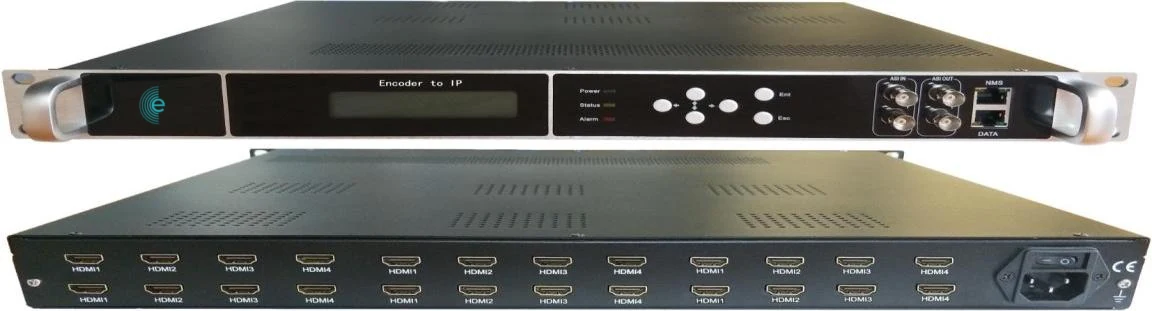
Bring satellite receivers, media players and in-house cameras into the IPTV system. The ES HDMI to IP encodes up to 24 HDMI sources to H.264 and streams each one as its own IP channel.
- 4 to 24 HDMI inputs
- H.264 encoding
- 1–13 Mbps per channel
- SPTS + MPTS over UDP/RTP
Overview
What it does
The bridge between HDMI sources and the IPTV network, typically used to encode subscription receivers and local content for hotels, hospitals and compounds.
- Models with 4, 8, 12, 16, 20 or 24 HDMI inputs
- MPEG-4 AVC/H.264 encoding of every input
- One SPTS per input plus one MPTS on the IP output
- IP output over UDP and RTP
- 2 ASI inputs, with optional ASI outputs mirroring the MPTS
- Null packet filtering, PID remapping and accurate PCR adjustment
- Front LCD and keypad for local operation
- Web management, SNMP and firmware updates over Ethernet
Specifications
Technical specifications
| HDMI inputs | 4, 8, 12, 16, 20 or 24, depending on model |
|---|---|
| Other inputs | 2 × ASI |
| IP output | One SPTS per HDMI input plus one MPTS, over UDP and RTP, on a 1000M Ethernet port |
| ASI output | 2 × ASI (optional), copy of the MPTS |
| Video encoding | MPEG-4 AVC/H.264, CBR, 1–13 Mbps per channel |
| Input resolutions | 1080p60, 1080i60, 1080p50, 1080i50, 720p60, 720p50, 576i50, 480i60 |
| Output resolutions | 1080p30, 1080p25, 720p30, 720p25, 576p25, 480p30 |
| Audio | MPEG-1 Layer II, 44.1 or 48 kHz, 64–384 kbps, adjustable gain |
| Multiplexing | Up to 180 output PIDs per channel, automatic or manual PID remapping, PCR adjustment |
| Management | Web interface (English), SNMP, LCD and keypad, Ethernet software upgrade |
| Power supply | AC 100–240 V, 50/60 Hz |
| Temperature | 0 to 45 °C operating, −20 to 80 °C storage |
Downloads
Downloads
Planning the content sources?
Tell us how many HDMI sources you need to distribute and we will size the encoder and the rest of the IPTV system around them.